Free Voice Levels Tool for Classroom Noise Management
The ultimate daily classroom essential. Act as your classroom’s red light / green light system to set the tone before class. Provide instant visual feedback with a one-tap praise burst for quiet, or a one-tap shake warning for noise. 100% free, zero prep.
🚀 Launch Voice Levels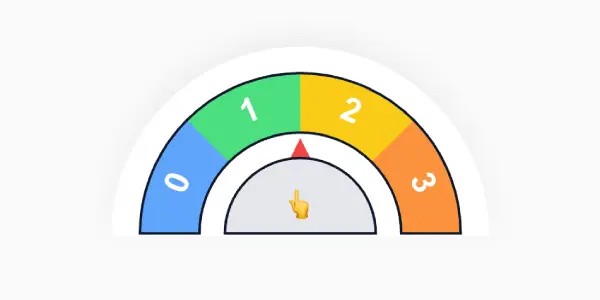
What is the DeskPety Voice Levels Tool?
The DeskPety Voice Levels tool is a daily classroom essential designed to help educators visually manage student volume. Instead of constantly verbally reminding students to “be quiet,” this tool serves as a clear, visual “red light / green light” system projected right on your smartboard.
It eliminates confusion by showing students exactly what volume is acceptable for the current activity - whether that’s absolute silence, a whisper, or collaborative group work.
How to Use the Voice Levels Tool in Your Classroom
Setting expectations has never been easier. Use this tool to set the tone before class or any activity:
- Set the Expectation: Launch the tool and select the target voice level (e.g., Silent, Whisper, Inside Voice) before the lesson begins.
- One-Tap Praise: When the class is working beautifully at the correct volume, use the one-tap praise burst for quiet to instantly reward and reinforce their good behavior.
- One-Tap Warning: If the chatter starts to rise, simply use the one-tap shake warning for noise. This visual and auditory cue grabs attention without you ever needing to raise your voice.
When to Use It - Ideal Classroom Scenarios
- Independent Reading & Testing: Lock the tool on the “Silent” level to ensure a distraction-free environment for deep work.
- Group Projects & Centers: Switch to “Inside Voices” so students know they can collaborate without disrupting other groups.
- Morning Work & Transitions: Set the tone before class starts, giving students a clear visual cue of the expected behavior the moment they walk through the door.
Why Teachers Love This Essential Management Tool
This tool saves your vocal cords. By relying on visual cues and interactive one-tap feedback rather than constant verbal corrections, you create a calmer, more self-regulated classroom environment. Because it runs seamlessly in your browser with no login required, it’s the easiest routine you can implement today.
Frequently Asked Questions
Do I need an account to use the Voice Levels tool?
No! Our Voice Levels monitor is completely free and requires zero registration. Just click launch and project it on your screen.
Does this tool require microphone access?
No, to ensure maximum privacy and zero technical friction, our tool does not record or listen to your classroom. It is a teacher-controlled visual management system utilizing a simple one-tap feedback mechanism for quiet or noise.
Can I use it on my interactive whiteboard?
Yes, the interface is specifically designed with large, high-contrast visuals that look perfect on smartboards, ensuring even the students in the back row can see the current voice expectation.